September 13, 2022
September 13, 2022
September 13, 2022
The containerless deployment
The containerless deployment
The containerless deployment
The dominant CI/ CD tools follow the principle of executing deployment pipelines in containers. This results in slow and complicated deployments. Our One Minute Deployment architecture achieves a 97% speedup by going containerless.
The dominant CI/ CD tools follow the principle of executing deployment pipelines in containers. This results in slow and complicated deployments. Our One Minute Deployment architecture achieves a 97% speedup by going containerless.
The dominant CI/ CD tools follow the principle of executing deployment pipelines in containers. This results in slow and complicated deployments. Our One Minute Deployment architecture achieves a 97% speedup by going containerless.
The emergence of containers led to a shift in software design patterns. Instead of building monoliths, developers split applications into independent services.
The microservice architecture offers many upsides, but it is a double-edged sword.
At Qubit9, we built a distributed storage solution. Designed as a cloud-native application, it is split into many domain-specific services. Then, in a state-of-the-art manner, we deploy the services in a Kubernetes cluster. Which enables the application to autoscale and convincingly handle load peaks.
Containers are great for deploying; not for building
Microservices also changed how we deploy software. Complex pipelines define the deployment process. Build tools execute these steps within containers. And this is where it all went wrong.
Deploying such a distributed system poses its own complex challenges. Most importantly, each microservice needs to be built and deployed separately. The emergence of containers offers us an excellent solution for deploying applications. However, containers are inadequate for building.
Popular deployment tools like GitHub Actions, Gitlab CI, or Jenkins follow the same flawed container-based approach.
Developing pipelines is inconvenient
The tools require us to define the pipeline steps in a text file. The steps are then executed within a container.
On first look, it doesn’t look that complicated. However, once you try to optimize or tweak something, you quickly feel the pain of this restrictive environment.
Especially, debugging pipelines itself is hardly possible. The most convenient is running them and looking at the logs. But, per contra, that can take a lot of time.
Furthermore, version managing a pipeline is hardly possible. It is tough to tune a pipeline and not disrupt the deployment flow for the team.
Execution is slow
Execution is the most essential part. Again we want a fast build, but it’s impossible due to containerization.
The container is an isolated entity on a virtualization layer. With that architecture comes high portability and isolation but also degraded performance.
During the build, we install the application’s dependencies. It takes around 30 seconds for a fresh install on a local machine. Within a container, it’s 30 minutes. With all the clever tricks of caching and image layering applied.
Rethinking deployment strategies
All these drawbacks led us to rethink our deployment strategy. Going containerless was the logical step going forward.
We refined the deployment pipeline to be as simple as a Makefile, executing each pipeline step as a bash script.
The deployment ran in just one minute while fixing most of the mentioned problems with containerization.
Locally, you control the execution environment. All tools are at your disposal to investigate build or test failures. You do not need to interact with a container to get information.
More importantly, the pipeline is way less complicated. There are no extra steps to build, cache, or upload images.
For that to work in production, we invented the runtime image.
The One Minute Deployment
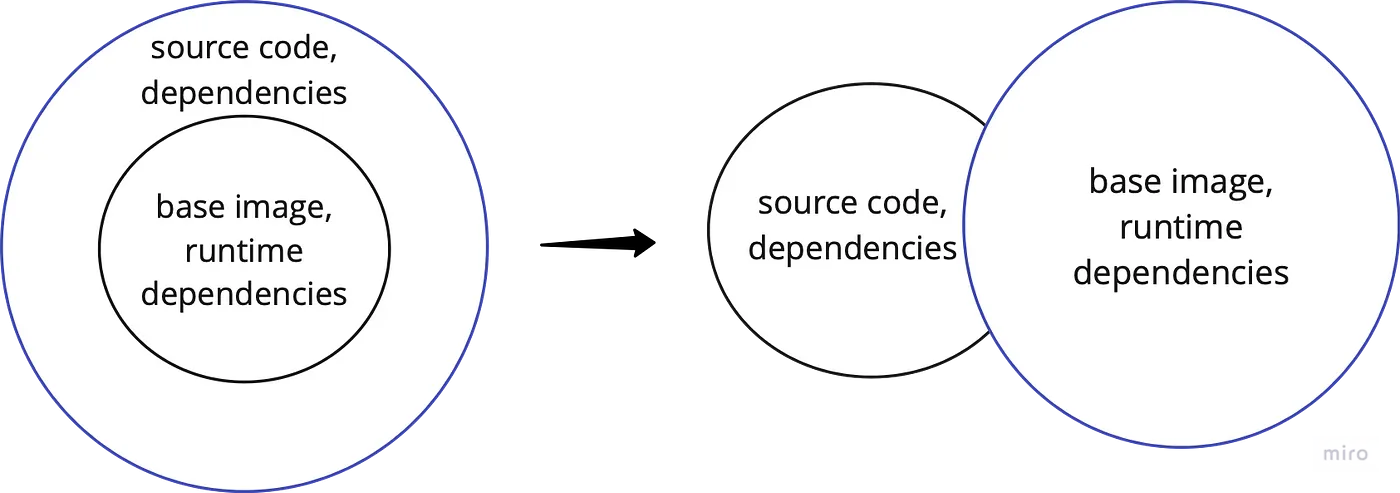
Traditionally, the container image has multiple layers. The base image carries the runtime dependencies. The application layer holds the source code and other application dependencies.
The runtime image only holds the runtime dependencies while attaching the application layer as a volume. Which allows us to just rebuild the application layer without needing to rebuild the container image. Figure 1 visualizes this evolution.
Transporting the code into our Kubernetes cluster was the final piece of the puzzle.
(R)Syncing the codebase to the cluster
Using rsync to sync the compiled code to the cluster to attach the code as a Persistent Volume to the running pod.
We leveraged the rsync tool to assemble the One Minute Deployment. The following figures explain its general architecture.
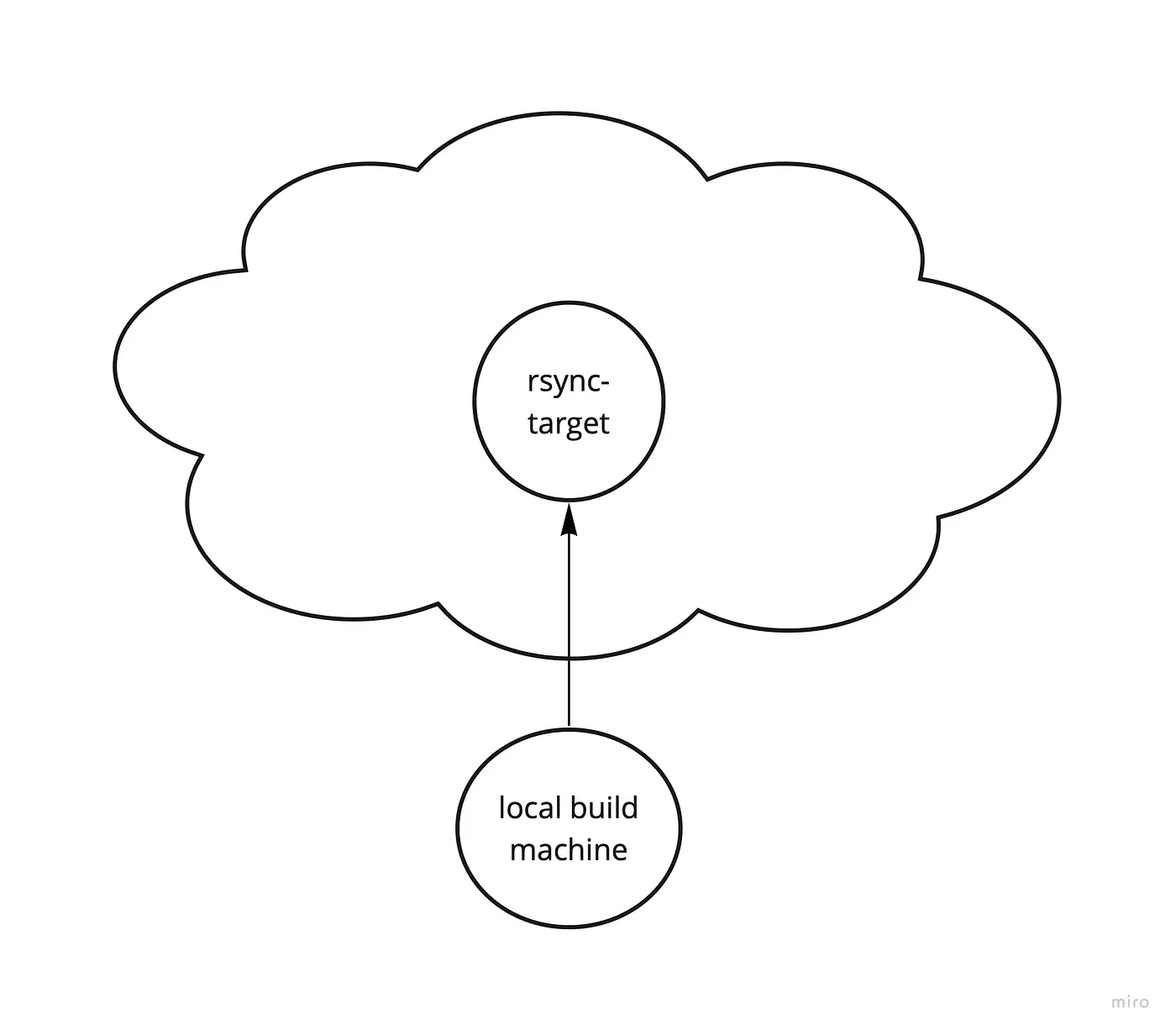
As shown in Figure 2, the designated build machine builds the codebase, runs the tests, and finally uploads the compiled code to a rsync target in the cluster. The target writes the codebase onto a Persistent Volume. The great benefit of using rsync is that it syncs the delta between the two commits.
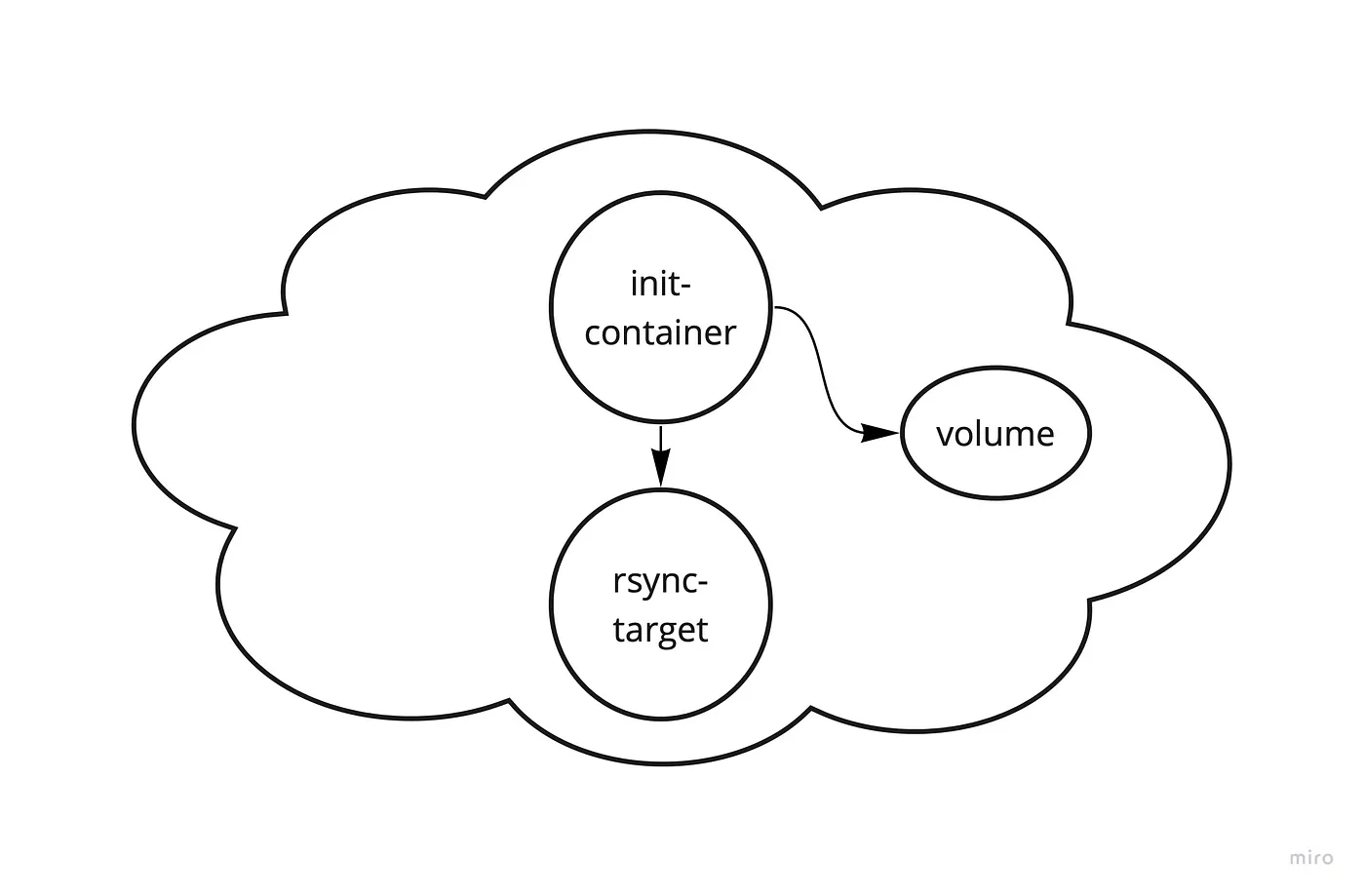
Initializing the volumes discussed earlier, we attach the codebase to the runtime container as a volume. However, this is not entirely trivial. For scaling reasons, the application pod should not handle the initialization of mentioned image, as this is managed by Kubernetes.
Therefore, the volume needs to be initialized before the application pod starts. We leverage Kubernetes InitContainer resources to do so.
Figure 3 shows the basic initialization flow.
As we deploy a new application revision, the InitContainer spawns, rsyncs the actual codebase to a Persistent Volume, and finally shuts down. The application pod is then ready to claim the volume, as shown in Figure 4. The application pod now executes its runargs; finally, the application is healthy.

Proof of Concept works; what's next?
Still, the One Minute deployment is a proof of concept that only works in a happy case. While building and syncing to the cluster work reliably, the test step of the pipeline is very rudimentary and does not detect test failures. Furthermore, the sync target is potentially a bottleneck. It’s unclear how it will perform when many pods try to start simultaneously.
Nonetheless, the results in this early stage are very encouraging and offer a great base to build upon.
While the architecture is universal, the One Minute Deplyoment only works for the Qubit9 application. Therefore I now focus on maturing it into a universally useful application that natively integrates into Kubernetes. The project will be open-sourced once it hits an alpha stage.
Please contact me if you want to provide feedback or if you’re interested in contributing.
The emergence of containers led to a shift in software design patterns. Instead of building monoliths, developers split applications into independent services.
The microservice architecture offers many upsides, but it is a double-edged sword.
At Qubit9, we built a distributed storage solution. Designed as a cloud-native application, it is split into many domain-specific services. Then, in a state-of-the-art manner, we deploy the services in a Kubernetes cluster. Which enables the application to autoscale and convincingly handle load peaks.
Containers are great for deploying; not for building
Microservices also changed how we deploy software. Complex pipelines define the deployment process. Build tools execute these steps within containers. And this is where it all went wrong.
Deploying such a distributed system poses its own complex challenges. Most importantly, each microservice needs to be built and deployed separately. The emergence of containers offers us an excellent solution for deploying applications. However, containers are inadequate for building.
Popular deployment tools like GitHub Actions, Gitlab CI, or Jenkins follow the same flawed container-based approach.
Developing pipelines is inconvenient
The tools require us to define the pipeline steps in a text file. The steps are then executed within a container.
On first look, it doesn’t look that complicated. However, once you try to optimize or tweak something, you quickly feel the pain of this restrictive environment.
Especially, debugging pipelines itself is hardly possible. The most convenient is running them and looking at the logs. But, per contra, that can take a lot of time.
Furthermore, version managing a pipeline is hardly possible. It is tough to tune a pipeline and not disrupt the deployment flow for the team.
Execution is slow
Execution is the most essential part. Again we want a fast build, but it’s impossible due to containerization.
The container is an isolated entity on a virtualization layer. With that architecture comes high portability and isolation but also degraded performance.
During the build, we install the application’s dependencies. It takes around 30 seconds for a fresh install on a local machine. Within a container, it’s 30 minutes. With all the clever tricks of caching and image layering applied.
Rethinking deployment strategies
All these drawbacks led us to rethink our deployment strategy. Going containerless was the logical step going forward.
We refined the deployment pipeline to be as simple as a Makefile, executing each pipeline step as a bash script.
The deployment ran in just one minute while fixing most of the mentioned problems with containerization.
Locally, you control the execution environment. All tools are at your disposal to investigate build or test failures. You do not need to interact with a container to get information.
More importantly, the pipeline is way less complicated. There are no extra steps to build, cache, or upload images.
For that to work in production, we invented the runtime image.
The One Minute Deployment
Traditionally, the container image has multiple layers. The base image carries the runtime dependencies. The application layer holds the source code and other application dependencies.
The runtime image only holds the runtime dependencies while attaching the application layer as a volume. Which allows us to just rebuild the application layer without needing to rebuild the container image. Figure 1 visualizes this evolution.
Transporting the code into our Kubernetes cluster was the final piece of the puzzle.
(R)Syncing the codebase to the cluster
Using rsync to sync the compiled code to the cluster to attach the code as a Persistent Volume to the running pod.
We leveraged the rsync tool to assemble the One Minute Deployment. The following figures explain its general architecture.
As shown in Figure 2, the designated build machine builds the codebase, runs the tests, and finally uploads the compiled code to a rsync target in the cluster. The target writes the codebase onto a Persistent Volume. The great benefit of using rsync is that it syncs the delta between the two commits.
Initializing the volumes discussed earlier, we attach the codebase to the runtime container as a volume. However, this is not entirely trivial. For scaling reasons, the application pod should not handle the initialization of mentioned image, as this is managed by Kubernetes.
Therefore, the volume needs to be initialized before the application pod starts. We leverage Kubernetes InitContainer resources to do so.
Figure 3 shows the basic initialization flow.
As we deploy a new application revision, the InitContainer spawns, rsyncs the actual codebase to a Persistent Volume, and finally shuts down. The application pod is then ready to claim the volume, as shown in Figure 4. The application pod now executes its runargs; finally, the application is healthy.
Proof of Concept works; what's next?
Still, the One Minute deployment is a proof of concept that only works in a happy case. While building and syncing to the cluster work reliably, the test step of the pipeline is very rudimentary and does not detect test failures. Furthermore, the sync target is potentially a bottleneck. It’s unclear how it will perform when many pods try to start simultaneously.
Nonetheless, the results in this early stage are very encouraging and offer a great base to build upon.
While the architecture is universal, the One Minute Deplyoment only works for the Qubit9 application. Therefore I now focus on maturing it into a universally useful application that natively integrates into Kubernetes. The project will be open-sourced once it hits an alpha stage.
Please contact me if you want to provide feedback or if you’re interested in contributing.
The emergence of containers led to a shift in software design patterns. Instead of building monoliths, developers split applications into independent services.
The microservice architecture offers many upsides, but it is a double-edged sword.
At Qubit9, we built a distributed storage solution. Designed as a cloud-native application, it is split into many domain-specific services. Then, in a state-of-the-art manner, we deploy the services in a Kubernetes cluster. Which enables the application to autoscale and convincingly handle load peaks.
Containers are great for deploying; not for building
Microservices also changed how we deploy software. Complex pipelines define the deployment process. Build tools execute these steps within containers. And this is where it all went wrong.
Deploying such a distributed system poses its own complex challenges. Most importantly, each microservice needs to be built and deployed separately. The emergence of containers offers us an excellent solution for deploying applications. However, containers are inadequate for building.
Popular deployment tools like GitHub Actions, Gitlab CI, or Jenkins follow the same flawed container-based approach.
Developing pipelines is inconvenient
The tools require us to define the pipeline steps in a text file. The steps are then executed within a container.
On first look, it doesn’t look that complicated. However, once you try to optimize or tweak something, you quickly feel the pain of this restrictive environment.
Especially, debugging pipelines itself is hardly possible. The most convenient is running them and looking at the logs. But, per contra, that can take a lot of time.
Furthermore, version managing a pipeline is hardly possible. It is tough to tune a pipeline and not disrupt the deployment flow for the team.
Execution is slow
Execution is the most essential part. Again we want a fast build, but it’s impossible due to containerization.
The container is an isolated entity on a virtualization layer. With that architecture comes high portability and isolation but also degraded performance.
During the build, we install the application’s dependencies. It takes around 30 seconds for a fresh install on a local machine. Within a container, it’s 30 minutes. With all the clever tricks of caching and image layering applied.
Rethinking deployment strategies
All these drawbacks led us to rethink our deployment strategy. Going containerless was the logical step going forward.
We refined the deployment pipeline to be as simple as a Makefile, executing each pipeline step as a bash script.
The deployment ran in just one minute while fixing most of the mentioned problems with containerization.
Locally, you control the execution environment. All tools are at your disposal to investigate build or test failures. You do not need to interact with a container to get information.
More importantly, the pipeline is way less complicated. There are no extra steps to build, cache, or upload images.
For that to work in production, we invented the runtime image.
The One Minute Deployment
Traditionally, the container image has multiple layers. The base image carries the runtime dependencies. The application layer holds the source code and other application dependencies.
The runtime image only holds the runtime dependencies while attaching the application layer as a volume. Which allows us to just rebuild the application layer without needing to rebuild the container image. Figure 1 visualizes this evolution.
Transporting the code into our Kubernetes cluster was the final piece of the puzzle.
(R)Syncing the codebase to the cluster
Using rsync to sync the compiled code to the cluster to attach the code as a Persistent Volume to the running pod.
We leveraged the rsync tool to assemble the One Minute Deployment. The following figures explain its general architecture.
As shown in Figure 2, the designated build machine builds the codebase, runs the tests, and finally uploads the compiled code to a rsync target in the cluster. The target writes the codebase onto a Persistent Volume. The great benefit of using rsync is that it syncs the delta between the two commits.
Initializing the volumes discussed earlier, we attach the codebase to the runtime container as a volume. However, this is not entirely trivial. For scaling reasons, the application pod should not handle the initialization of mentioned image, as this is managed by Kubernetes.
Therefore, the volume needs to be initialized before the application pod starts. We leverage Kubernetes InitContainer resources to do so.
Figure 3 shows the basic initialization flow.
As we deploy a new application revision, the InitContainer spawns, rsyncs the actual codebase to a Persistent Volume, and finally shuts down. The application pod is then ready to claim the volume, as shown in Figure 4. The application pod now executes its runargs; finally, the application is healthy.
Proof of Concept works; what's next?
Still, the One Minute deployment is a proof of concept that only works in a happy case. While building and syncing to the cluster work reliably, the test step of the pipeline is very rudimentary and does not detect test failures. Furthermore, the sync target is potentially a bottleneck. It’s unclear how it will perform when many pods try to start simultaneously.
Nonetheless, the results in this early stage are very encouraging and offer a great base to build upon.
While the architecture is universal, the One Minute Deplyoment only works for the Qubit9 application. Therefore I now focus on maturing it into a universally useful application that natively integrates into Kubernetes. The project will be open-sourced once it hits an alpha stage.
Please contact me if you want to provide feedback or if you’re interested in contributing.