October 31, 2023
October 31, 2023
October 31, 2023
WebAssembly, WASI and the Component Model. A comprehensive overview.
WebAssembly, WASI and the Component Model. A comprehensive overview.
WebAssembly, WASI and the Component Model. A comprehensive overview.
This article navigates through WebAssembly’s (Wasm) journey, spotlighting its evolving adoption and practical implementations, notably by Adobe Systems. It meticulously unpacks the synergy between WebAssembly and various programming languages, illustrating a transformative blueprint for robust, platform-agnostic applications. Central to the discussion are the WebAssembly System Interface (WASI) and the WebAssembly Component Model. The narrative demystifies the complexities, offering a lucid perspective on WebAssembly’s capabilities and future in web application landscapes.
This article navigates through WebAssembly’s (Wasm) journey, spotlighting its evolving adoption and practical implementations, notably by Adobe Systems. It meticulously unpacks the synergy between WebAssembly and various programming languages, illustrating a transformative blueprint for robust, platform-agnostic applications. Central to the discussion are the WebAssembly System Interface (WASI) and the WebAssembly Component Model. The narrative demystifies the complexities, offering a lucid perspective on WebAssembly’s capabilities and future in web application landscapes.
This article navigates through WebAssembly’s (Wasm) journey, spotlighting its evolving adoption and practical implementations, notably by Adobe Systems. It meticulously unpacks the synergy between WebAssembly and various programming languages, illustrating a transformative blueprint for robust, platform-agnostic applications. Central to the discussion are the WebAssembly System Interface (WASI) and the WebAssembly Component Model. The narrative demystifies the complexities, offering a lucid perspective on WebAssembly’s capabilities and future in web application landscapes.
Abstract:
This article navigates through WebAssembly’s (Wasm) journey, spotlighting its evolving adoption and practical implementations, notably by Adobe Systems. It meticulously unpacks the synergy between WebAssembly and various programming languages, illustrating a transformative blueprint for robust, platform-agnostic applications. Central to the discussion are the WebAssembly System Interface (WASI) and the WebAssembly Component Model. The narrative demystifies the complexities, offering a lucid perspective on WebAssembly’s capabilities and future in web application landscapes.
Introduction
I discovered WebAssembly as I was looking for an alternative to containers. I am dissatisfied with how complex deployments have become and what microservice architectures have done to our applications. It's frankly impossible to understand the inner workings of such an application. We will migrate back toward monolithic applications and scale these through replica sets. WebAssembly allows us to build these applications modularly and with a native toolchain. Therefore, we will drastically reduce the need for DevOps and build platform-agnostic applications.
Early adopters start to evaluate WebAssembly
Six years after its initial release as a replacement for Javascript, WebAssembly finally shows sights of broader adoption. Adobe Systems started to evaluate the technology back in 2021. Recently, on the 27th of September 2023, Adobe launched its Photoshop on the web after two years of beta testing—a milestone both for Adobe and WebAssembly. It marks the first real-world example of bringing high-performance applications into the browser. With WebAssembly, Adobe engineers built their first genuinely platform-agnostic application, and Linux users finally experience Photoshop on their machines.
In the meantime, Adobe doubled down on the technology by partnering with the Open-Source framework wasmCloud to build proof-of-concept apps with WebAssembly on the backend.
The proof of concept follows the idea of compiling supporting libraries to WebAssembly modules and attaching these modules as sidecar containers to the core application containers. The application would then use the extra functionality supplied by the sidecars. This approach plays right into WebAssembly's exceptional cold start times. The modules start up to 10x and execute 3x faster than Linux containers.
So far, so good, but that's not the kind of improvement one would need to start adopting WebAssembly. Adobe concluded: "We are waiting for WASI to catch up," I will add that they are waiting for the component model to become stable.
The WebAssembly Systems Interface (WASI) and the WebAssembly Component Model are the most critical projects within the WebAssembly working group. Their understanding is essential; therefore, I will continue diving deep into them.
What is WebAssembly?
If you are unfamiliar with WebAssembly and WASI, you're probably confused about how I went from Photoshop in the browser to using WebAsssembly in a containerized environment. I will explain to you what happened.
Mozilla announced WebAssembly in 2015 as a new type of code that can be run in modern web browsers — it is a low-level assembly-like language with a compact binary format that runs with near-native performance and provides languages such as C/C++, C# and Rust with a compilation target so that they can run on the web. It is also designed to run alongside JavaScript, allowing both to work together.
Building web applications with WebAssembly
Think of Adobe Photoshop web as a combination of Rust and JavaScript, where both languages get to show their strengths.
The latter offers a great toolset for creating responsive designs and excellent interfaces but is inefficient and unusable for the intense computations required by image processing tasks. Rust, in contrast, excels in computing scenarios like image processing but usually does not work in a web environment.
Instead of writing image processing algorithms in JavaScript, the website instantiates and executes embedded WebAssembly modules. These modules provide the required image processing capabilities for the web application and ensure its performance.
Check out the seamless interaction between JavaScript and WebAssembly below. The sample flow shows the semantics of cutting an image within a WebAssembly module. First, we instantiate the WebAssembly module within the browser runtime, execute the "cut_image" function on an image we want to cut, and work with the result afterward.
<body>
    <script>
      WebAssembly.compileStreaming(fetch("image.wasm"))
      .then(module => {
        // call function "cut_image" in module
        const cut_image = module.instance.exports.cut_image(image);
        //do something with cut_image
      });
    </script>
</body>
I consider this the blueprint for the next generation of application design. Not only can we perform complex computations in the browser, but more importantly, we build platform-agnostic apps.
Today, browser engines like Chromium are virtual machines that natively support WebAssembly. We compile the binary to work with the virtual machine and the machine to work with the target platform.
Platform agnostic applications
That way, we create a consistent compilation target for our applications across all platforms. Figure 1 visualizes the difference in compiling the application for each target architecture.
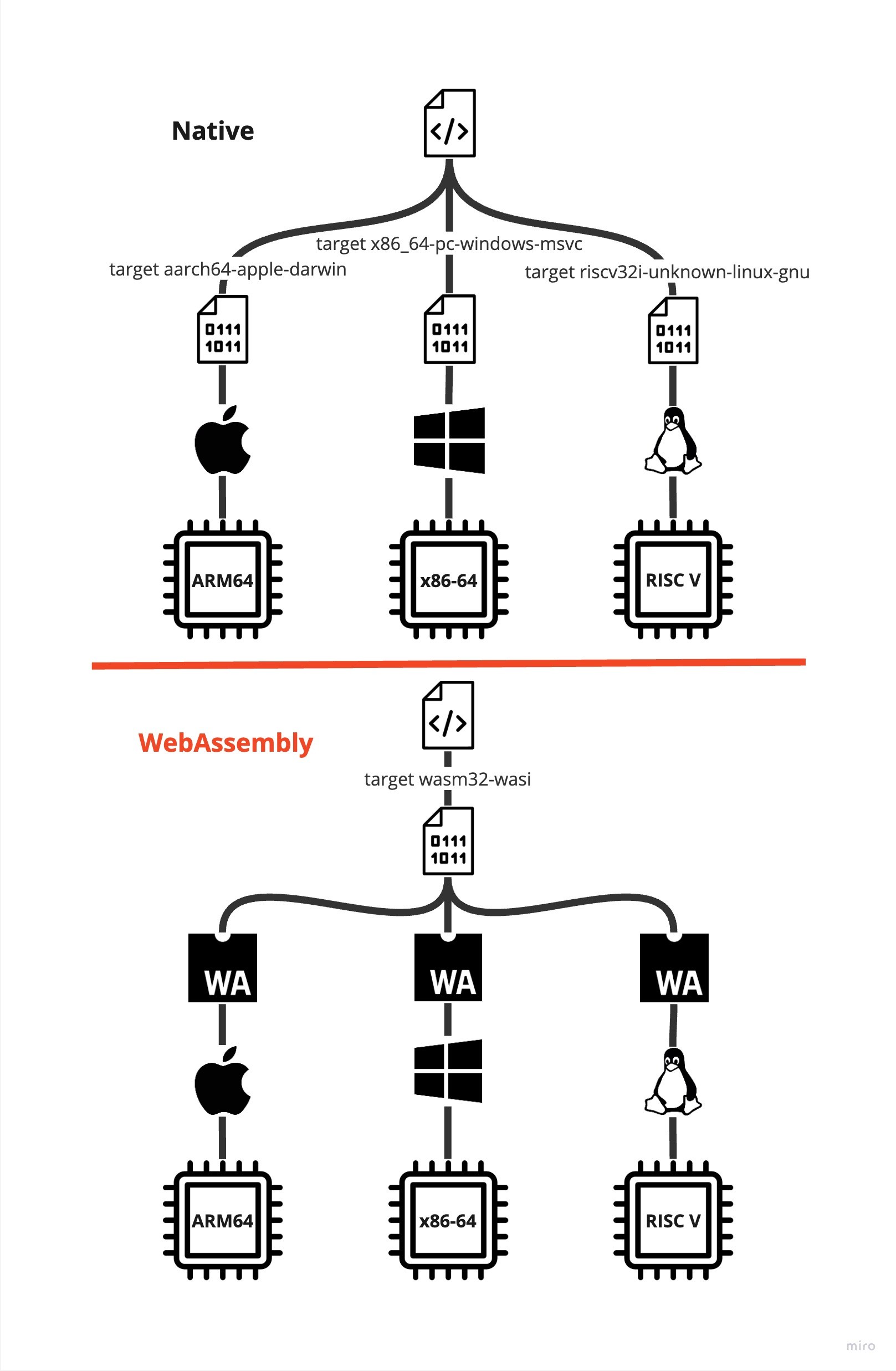
Platform agnosticism becomes increasingly beneficial for backend applications as well. The days of homogeneous clusters on the x86-64 architecture are over. ARM and RISC V benefitted greatly from the ongoing extension towards edge computing and even have found their way into larger-scale cloud computing centers. Any application that wants to live on the edge must be compatible with these architectures.
Serverside WebAssembly
That's enough fruit for the effort to move WebAssembly outside the browser and use it as a backend technology. However, there are a few technical obstacles in the way. It's not feasible to run server applications within web browsers anymore. Therefore, it's time to build a standalone virtual machine. It is a very complex task due to how applications access system resources and the consequential need to construct a WebAssembly System Interface (WASI).
WebAssembly System Interface (WASI)
Applications cannot access the system's resources like files and sockets themselves. That would be incredibly risky, and therefore, they typically request access to system resources through a systems interface provided by the kernel. The system interface abstracts the complexities of the underlying hardware and operating system and provides a consistent way for applications to access system resources.
The WebAssembly runtime is a sandboxed environment. The applications within cannot access the underlying kernel. Reconsider Figure 1; we compile the application to the wasm32-wasi target. That is the virtual machine system interface, which is consistent across all platforms. The virtual machine translates between the wasi and kernel interfaces.
WASI modules
The security measures don't stop here. WASI embraces the principle of least privilege and lets the developer decide which parts of the system interface an application can use. Therefore, WASI consists of multiple capability-based subsets of interfaces. Figure 2 visualizes an overview of these interface sets below.
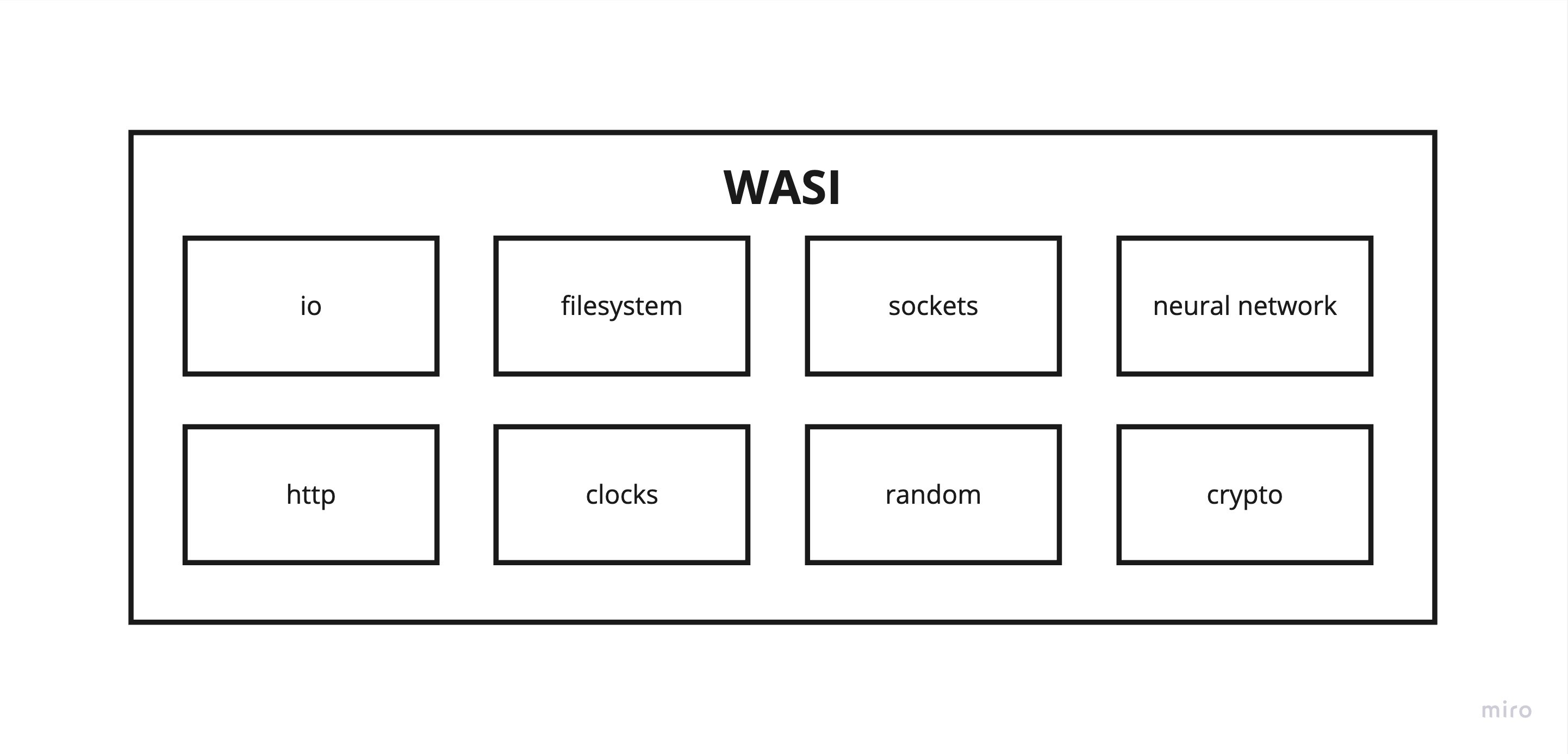
The core modules like io, filesystem, and http provide the essential functionality to build an application. Probably every WebAssembly cloud host will implement these functionalities on their systems.
The domain-specific modules like neural networks and crypto allow hosts to differentiate themselves because not every host can support a host implementation for these WASI interfaces as they may require specialized hardware.
Regardless, the WebAssembly application remains portable across all hosts implementing the applications module imports.
Building a WASI application
I will define these imports for a sample application. My intent with the application is to test the wasi-http module. I've long awaited that module because connectivity is essential to many applications.
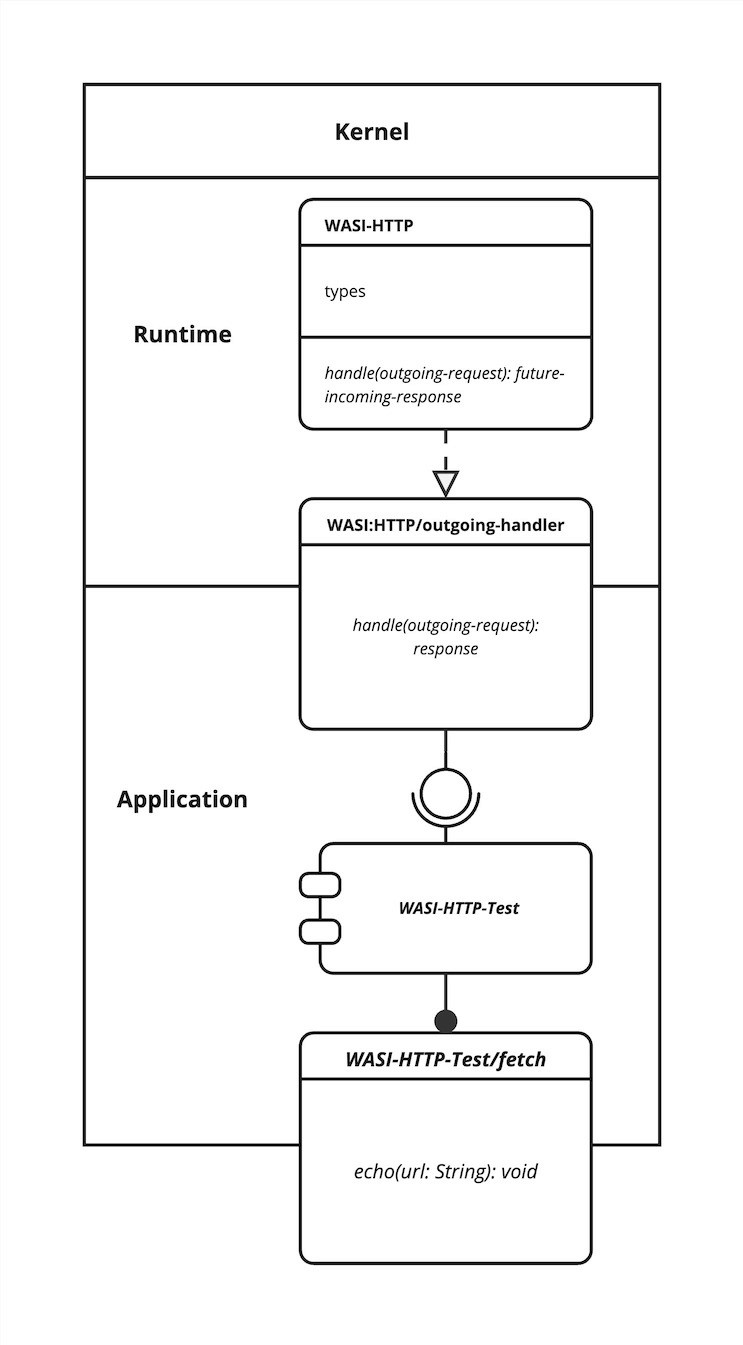
The wasi-http module currently exports two interfaces, one for incoming and one for outgoing requests. I use the outgoing-handler interface to create a low-level http implementation to make an outbound request to a URL and await the response.
I wrap this implementation within the echo function. The echo function takes the URL as a parameter, executes the request logic, and prints the response to stdout. Figure 3 visualizes my WASI-HTTP-Test application with the URL.
Finally, I compile my Rust implementation to wasm32-wasi and receive a WebAssembly module binary. After executing the binary within the wasmtime runtime, I can report that wasi-http works!
WebAssembly Component Model
With wasi-http successfully tested, I created an application with the WebAssembly Component Model.
The Component Model provides a way to compose a WebAssembly application from multiple component binaries. That way, we maintain a modular architecture but get the benefit that all these binaries run on the same machine.
It's a smooth transition from a WebAssembly module to a component. Components are just modules with an extra layer of information about the interfaces they import and export. The WebAssembly Interface Type (WIT) IDL is the native language used to create the meta information.
The WIT format provides tooling for the WebAssembly Component Model in two primary ways.
WIT is a developer-friendly format to describe the imports and exports to a component. It is easy to read and write and provides the foundation for producing components from guest languages and consuming components in host languages. See the WIT file for our WASI-HTTP-Test module that would turn it into a component.
package WASI-HTTP-Test@0.1.0
interface fetch {
    echo: func(url: string) -> void
}
world WASI-HTTP-Test {
    import wasi:http/outgoing-handler
    export fetch
}
The package header declares the name and version of our component—a scheme carried over from the OCI reference. The Component Model introduces the concept of a world. The world determines the execution environment the binary will live in. It is built on top of the capability-based design of WASI and is the place to import any required interfaces. These interfaces are either WASI interfaces or component interfaces.
Host components import other components, and guest components only import WASI interfaces.
WIT packages are the basis of sharing types and definitions in an ecosystem of components. Authors can import types from other WIT packages when generating a component, publish a WIT package representing a host embedding, or collaborate on a WIT definition of a shared set of APIs between platforms.
The Component Model's idea is that developers write and publish a variety of components to a registry for others to use. Understand this as a unified package manager across Rust, Golang, C, C++, C#, Java, and JavaScript. Combining all these languages into one application is possible because we only talk over interfaces; the implementations all compile to the same uniform binary code. We even get to switch out the implementations behind the interfaces without penalty.
At the time of doing this, I had the problem of downloading a few pictures out of an archive. I went to solve this problem with a multi-component application I call the ImageApp. Figure 4 visualizes the app.
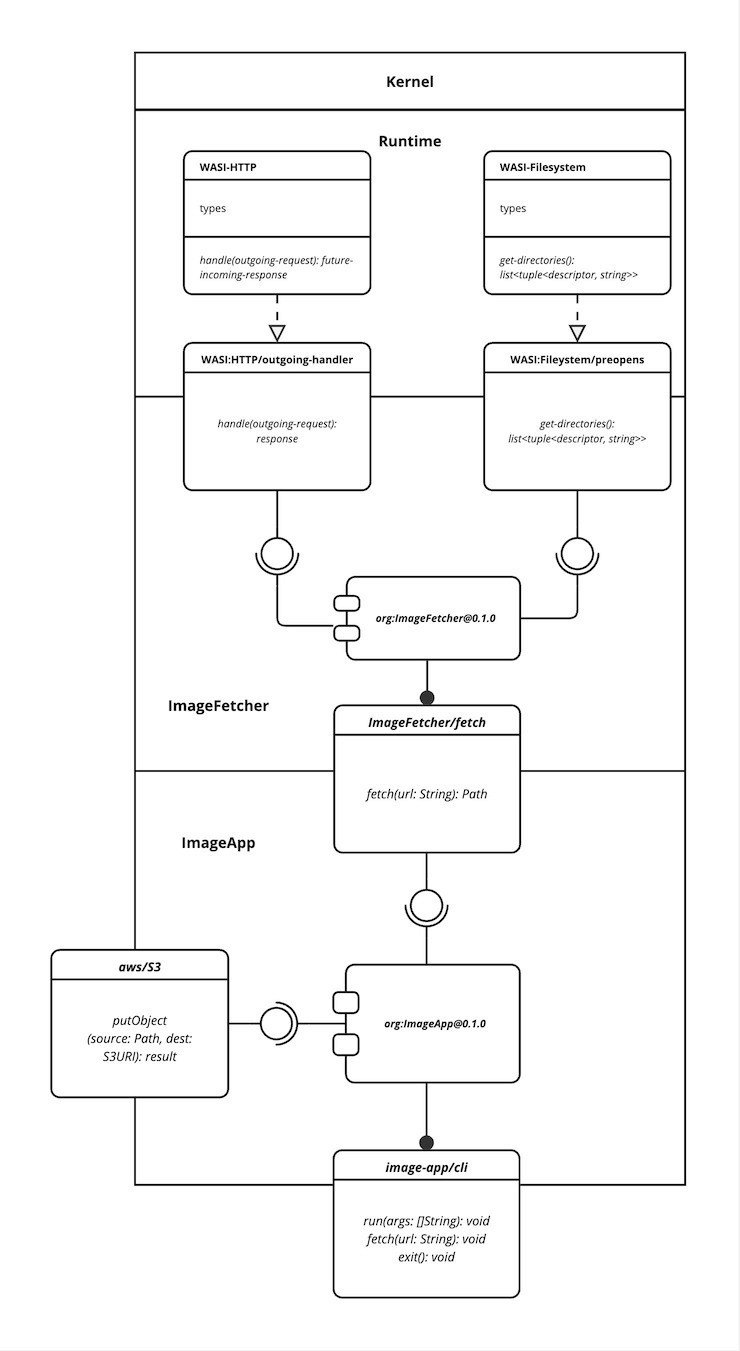
I evolved the WASI-HTTP-Test module into the ImageFetcher component that saves images from an archive URL to the filesystem. To access the filesystem, I needed to import the wasi-filesystem interface and pass a file descriptor to the application. The file descriptor carries information on which directory the app may use.
The ImageFetcher Furthermore, I dared to look into the future and add a hypothetical S3 library component. The connector manages the connections to a S3 bucket and uploads my images.
Components like the ImageFetcher are reactor components. They act as libraries comparable to the sidecar container we discussed earlier. The runtime instantiates the components depending on when their functionality is needed.
Soon, it will be possible to load these components from a file path and not out of the main component. That would allow the hot-plugging of such modules by simply changing the file to a new version.
The main ImageApp component, however, is a command component. These components define a run function and manage the program by calling reactor components to do something. In our case, download the images from an internet archive and then upload them into a S3 bucket.
The sequence diagram below visualizes the application's lifecycle.
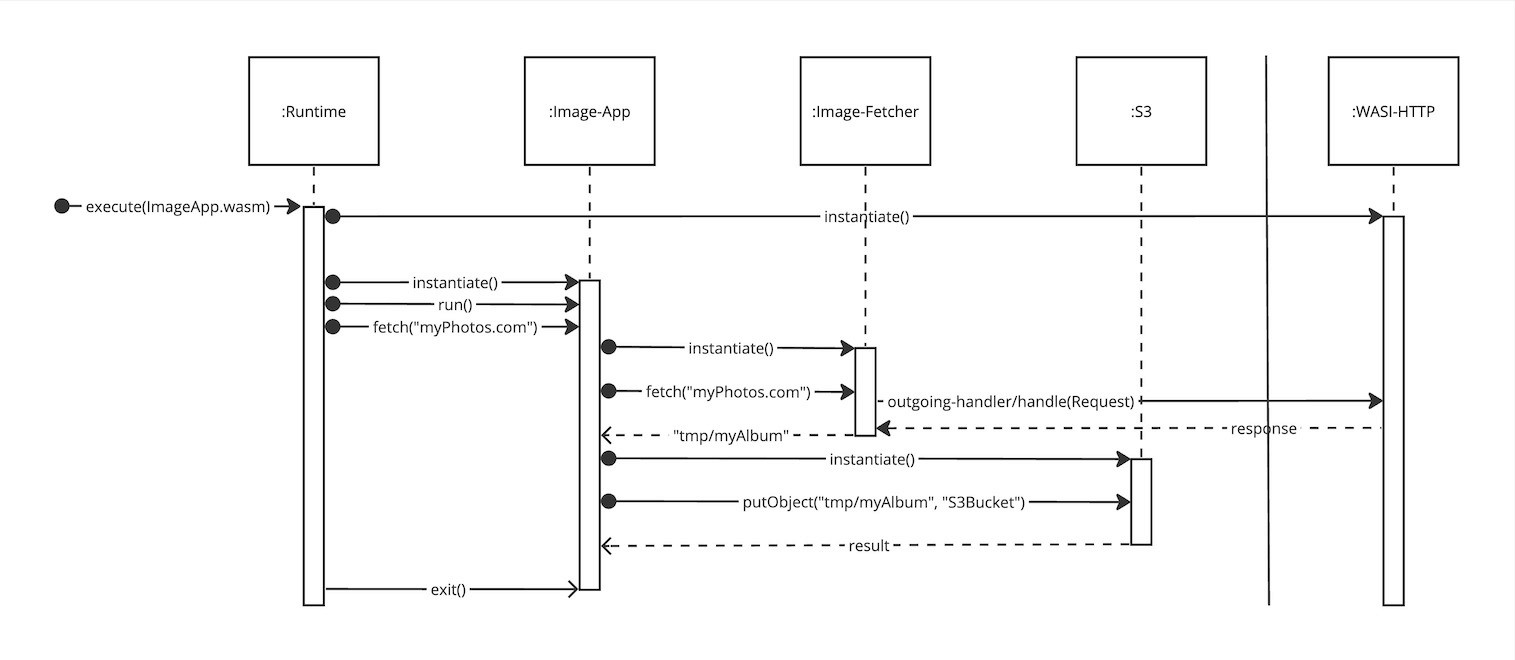
The Component Model is a significant step for WebAssembly. It achieves the same modularity that microservices promise, and it even scales to zero. I think it's just magnificent how only needed components execute and then shut down again. Indeed, I can achieve the same behavior with container services, but WebAssembly does this natively. I feel great about building monoliths again, and WebAssembly is the way forward!
Conclusion
In this article, I've led you through an explorative journey through the WebAssembly ecosystem. What started as a complement to JavaScript ended up with the potential to disrupt how we build cloud applications. The WebAssembly System Interface introduces a new way to maintain portability and security without containers. It allows us to create platform-agnostic applications ready to run on any architecture. That will be crucial as we navigate toward edge computing.
These applications may be composed of components from whatever language compiles to WebAssembly. Finally, we will move away from microservices and overwhelmingly complex deployments.
Abstract:
This article navigates through WebAssembly’s (Wasm) journey, spotlighting its evolving adoption and practical implementations, notably by Adobe Systems. It meticulously unpacks the synergy between WebAssembly and various programming languages, illustrating a transformative blueprint for robust, platform-agnostic applications. Central to the discussion are the WebAssembly System Interface (WASI) and the WebAssembly Component Model. The narrative demystifies the complexities, offering a lucid perspective on WebAssembly’s capabilities and future in web application landscapes.
Introduction
I discovered WebAssembly as I was looking for an alternative to containers. I am dissatisfied with how complex deployments have become and what microservice architectures have done to our applications. It's frankly impossible to understand the inner workings of such an application. We will migrate back toward monolithic applications and scale these through replica sets. WebAssembly allows us to build these applications modularly and with a native toolchain. Therefore, we will drastically reduce the need for DevOps and build platform-agnostic applications.
Early adopters start to evaluate WebAssembly
Six years after its initial release as a replacement for Javascript, WebAssembly finally shows sights of broader adoption. Adobe Systems started to evaluate the technology back in 2021. Recently, on the 27th of September 2023, Adobe launched its Photoshop on the web after two years of beta testing—a milestone both for Adobe and WebAssembly. It marks the first real-world example of bringing high-performance applications into the browser. With WebAssembly, Adobe engineers built their first genuinely platform-agnostic application, and Linux users finally experience Photoshop on their machines.
In the meantime, Adobe doubled down on the technology by partnering with the Open-Source framework wasmCloud to build proof-of-concept apps with WebAssembly on the backend.
The proof of concept follows the idea of compiling supporting libraries to WebAssembly modules and attaching these modules as sidecar containers to the core application containers. The application would then use the extra functionality supplied by the sidecars. This approach plays right into WebAssembly's exceptional cold start times. The modules start up to 10x and execute 3x faster than Linux containers.
So far, so good, but that's not the kind of improvement one would need to start adopting WebAssembly. Adobe concluded: "We are waiting for WASI to catch up," I will add that they are waiting for the component model to become stable.
The WebAssembly Systems Interface (WASI) and the WebAssembly Component Model are the most critical projects within the WebAssembly working group. Their understanding is essential; therefore, I will continue diving deep into them.
What is WebAssembly?
If you are unfamiliar with WebAssembly and WASI, you're probably confused about how I went from Photoshop in the browser to using WebAsssembly in a containerized environment. I will explain to you what happened.
Mozilla announced WebAssembly in 2015 as a new type of code that can be run in modern web browsers — it is a low-level assembly-like language with a compact binary format that runs with near-native performance and provides languages such as C/C++, C# and Rust with a compilation target so that they can run on the web. It is also designed to run alongside JavaScript, allowing both to work together.
Building web applications with WebAssembly
Think of Adobe Photoshop web as a combination of Rust and JavaScript, where both languages get to show their strengths.
The latter offers a great toolset for creating responsive designs and excellent interfaces but is inefficient and unusable for the intense computations required by image processing tasks. Rust, in contrast, excels in computing scenarios like image processing but usually does not work in a web environment.
Instead of writing image processing algorithms in JavaScript, the website instantiates and executes embedded WebAssembly modules. These modules provide the required image processing capabilities for the web application and ensure its performance.
Check out the seamless interaction between JavaScript and WebAssembly below. The sample flow shows the semantics of cutting an image within a WebAssembly module. First, we instantiate the WebAssembly module within the browser runtime, execute the "cut_image" function on an image we want to cut, and work with the result afterward.
<body>
    <script>
      WebAssembly.compileStreaming(fetch("image.wasm"))
      .then(module => {
        // call function "cut_image" in module
        const cut_image = module.instance.exports.cut_image(image);
        //do something with cut_image
      });
    </script>
</body>
I consider this the blueprint for the next generation of application design. Not only can we perform complex computations in the browser, but more importantly, we build platform-agnostic apps.
Today, browser engines like Chromium are virtual machines that natively support WebAssembly. We compile the binary to work with the virtual machine and the machine to work with the target platform.
Platform agnostic applications
That way, we create a consistent compilation target for our applications across all platforms. Figure 1 visualizes the difference in compiling the application for each target architecture.
Platform agnosticism becomes increasingly beneficial for backend applications as well. The days of homogeneous clusters on the x86-64 architecture are over. ARM and RISC V benefitted greatly from the ongoing extension towards edge computing and even have found their way into larger-scale cloud computing centers. Any application that wants to live on the edge must be compatible with these architectures.
Serverside WebAssembly
That's enough fruit for the effort to move WebAssembly outside the browser and use it as a backend technology. However, there are a few technical obstacles in the way. It's not feasible to run server applications within web browsers anymore. Therefore, it's time to build a standalone virtual machine. It is a very complex task due to how applications access system resources and the consequential need to construct a WebAssembly System Interface (WASI).
WebAssembly System Interface (WASI)
Applications cannot access the system's resources like files and sockets themselves. That would be incredibly risky, and therefore, they typically request access to system resources through a systems interface provided by the kernel. The system interface abstracts the complexities of the underlying hardware and operating system and provides a consistent way for applications to access system resources.
The WebAssembly runtime is a sandboxed environment. The applications within cannot access the underlying kernel. Reconsider Figure 1; we compile the application to the wasm32-wasi target. That is the virtual machine system interface, which is consistent across all platforms. The virtual machine translates between the wasi and kernel interfaces.
WASI modules
The security measures don't stop here. WASI embraces the principle of least privilege and lets the developer decide which parts of the system interface an application can use. Therefore, WASI consists of multiple capability-based subsets of interfaces. Figure 2 visualizes an overview of these interface sets below.
The core modules like io, filesystem, and http provide the essential functionality to build an application. Probably every WebAssembly cloud host will implement these functionalities on their systems.
The domain-specific modules like neural networks and crypto allow hosts to differentiate themselves because not every host can support a host implementation for these WASI interfaces as they may require specialized hardware.
Regardless, the WebAssembly application remains portable across all hosts implementing the applications module imports.
Building a WASI application
I will define these imports for a sample application. My intent with the application is to test the wasi-http module. I've long awaited that module because connectivity is essential to many applications.
The wasi-http module currently exports two interfaces, one for incoming and one for outgoing requests. I use the outgoing-handler interface to create a low-level http implementation to make an outbound request to a URL and await the response.
I wrap this implementation within the echo function. The echo function takes the URL as a parameter, executes the request logic, and prints the response to stdout. Figure 3 visualizes my WASI-HTTP-Test application with the URL.
Finally, I compile my Rust implementation to wasm32-wasi and receive a WebAssembly module binary. After executing the binary within the wasmtime runtime, I can report that wasi-http works!
WebAssembly Component Model
With wasi-http successfully tested, I created an application with the WebAssembly Component Model.
The Component Model provides a way to compose a WebAssembly application from multiple component binaries. That way, we maintain a modular architecture but get the benefit that all these binaries run on the same machine.
It's a smooth transition from a WebAssembly module to a component. Components are just modules with an extra layer of information about the interfaces they import and export. The WebAssembly Interface Type (WIT) IDL is the native language used to create the meta information.
The WIT format provides tooling for the WebAssembly Component Model in two primary ways.
WIT is a developer-friendly format to describe the imports and exports to a component. It is easy to read and write and provides the foundation for producing components from guest languages and consuming components in host languages. See the WIT file for our WASI-HTTP-Test module that would turn it into a component.
package WASI-HTTP-Test@0.1.0
interface fetch {
    echo: func(url: string) -> void
}
world WASI-HTTP-Test {
    import wasi:http/outgoing-handler
    export fetch
}
The package header declares the name and version of our component—a scheme carried over from the OCI reference. The Component Model introduces the concept of a world. The world determines the execution environment the binary will live in. It is built on top of the capability-based design of WASI and is the place to import any required interfaces. These interfaces are either WASI interfaces or component interfaces.
Host components import other components, and guest components only import WASI interfaces.
WIT packages are the basis of sharing types and definitions in an ecosystem of components. Authors can import types from other WIT packages when generating a component, publish a WIT package representing a host embedding, or collaborate on a WIT definition of a shared set of APIs between platforms.
The Component Model's idea is that developers write and publish a variety of components to a registry for others to use. Understand this as a unified package manager across Rust, Golang, C, C++, C#, Java, and JavaScript. Combining all these languages into one application is possible because we only talk over interfaces; the implementations all compile to the same uniform binary code. We even get to switch out the implementations behind the interfaces without penalty.
At the time of doing this, I had the problem of downloading a few pictures out of an archive. I went to solve this problem with a multi-component application I call the ImageApp. Figure 4 visualizes the app.
I evolved the WASI-HTTP-Test module into the ImageFetcher component that saves images from an archive URL to the filesystem. To access the filesystem, I needed to import the wasi-filesystem interface and pass a file descriptor to the application. The file descriptor carries information on which directory the app may use.
The ImageFetcher Furthermore, I dared to look into the future and add a hypothetical S3 library component. The connector manages the connections to a S3 bucket and uploads my images.
Components like the ImageFetcher are reactor components. They act as libraries comparable to the sidecar container we discussed earlier. The runtime instantiates the components depending on when their functionality is needed.
Soon, it will be possible to load these components from a file path and not out of the main component. That would allow the hot-plugging of such modules by simply changing the file to a new version.
The main ImageApp component, however, is a command component. These components define a run function and manage the program by calling reactor components to do something. In our case, download the images from an internet archive and then upload them into a S3 bucket.
The sequence diagram below visualizes the application's lifecycle.
The Component Model is a significant step for WebAssembly. It achieves the same modularity that microservices promise, and it even scales to zero. I think it's just magnificent how only needed components execute and then shut down again. Indeed, I can achieve the same behavior with container services, but WebAssembly does this natively. I feel great about building monoliths again, and WebAssembly is the way forward!
Conclusion
In this article, I've led you through an explorative journey through the WebAssembly ecosystem. What started as a complement to JavaScript ended up with the potential to disrupt how we build cloud applications. The WebAssembly System Interface introduces a new way to maintain portability and security without containers. It allows us to create platform-agnostic applications ready to run on any architecture. That will be crucial as we navigate toward edge computing.
These applications may be composed of components from whatever language compiles to WebAssembly. Finally, we will move away from microservices and overwhelmingly complex deployments.
Abstract:
This article navigates through WebAssembly’s (Wasm) journey, spotlighting its evolving adoption and practical implementations, notably by Adobe Systems. It meticulously unpacks the synergy between WebAssembly and various programming languages, illustrating a transformative blueprint for robust, platform-agnostic applications. Central to the discussion are the WebAssembly System Interface (WASI) and the WebAssembly Component Model. The narrative demystifies the complexities, offering a lucid perspective on WebAssembly’s capabilities and future in web application landscapes.
Introduction
I discovered WebAssembly as I was looking for an alternative to containers. I am dissatisfied with how complex deployments have become and what microservice architectures have done to our applications. It's frankly impossible to understand the inner workings of such an application. We will migrate back toward monolithic applications and scale these through replica sets. WebAssembly allows us to build these applications modularly and with a native toolchain. Therefore, we will drastically reduce the need for DevOps and build platform-agnostic applications.
Early adopters start to evaluate WebAssembly
Six years after its initial release as a replacement for Javascript, WebAssembly finally shows sights of broader adoption. Adobe Systems started to evaluate the technology back in 2021. Recently, on the 27th of September 2023, Adobe launched its Photoshop on the web after two years of beta testing—a milestone both for Adobe and WebAssembly. It marks the first real-world example of bringing high-performance applications into the browser. With WebAssembly, Adobe engineers built their first genuinely platform-agnostic application, and Linux users finally experience Photoshop on their machines.
In the meantime, Adobe doubled down on the technology by partnering with the Open-Source framework wasmCloud to build proof-of-concept apps with WebAssembly on the backend.
The proof of concept follows the idea of compiling supporting libraries to WebAssembly modules and attaching these modules as sidecar containers to the core application containers. The application would then use the extra functionality supplied by the sidecars. This approach plays right into WebAssembly's exceptional cold start times. The modules start up to 10x and execute 3x faster than Linux containers.
So far, so good, but that's not the kind of improvement one would need to start adopting WebAssembly. Adobe concluded: "We are waiting for WASI to catch up," I will add that they are waiting for the component model to become stable.
The WebAssembly Systems Interface (WASI) and the WebAssembly Component Model are the most critical projects within the WebAssembly working group. Their understanding is essential; therefore, I will continue diving deep into them.
What is WebAssembly?
If you are unfamiliar with WebAssembly and WASI, you're probably confused about how I went from Photoshop in the browser to using WebAsssembly in a containerized environment. I will explain to you what happened.
Mozilla announced WebAssembly in 2015 as a new type of code that can be run in modern web browsers — it is a low-level assembly-like language with a compact binary format that runs with near-native performance and provides languages such as C/C++, C# and Rust with a compilation target so that they can run on the web. It is also designed to run alongside JavaScript, allowing both to work together.
Building web applications with WebAssembly
Think of Adobe Photoshop web as a combination of Rust and JavaScript, where both languages get to show their strengths.
The latter offers a great toolset for creating responsive designs and excellent interfaces but is inefficient and unusable for the intense computations required by image processing tasks. Rust, in contrast, excels in computing scenarios like image processing but usually does not work in a web environment.
Instead of writing image processing algorithms in JavaScript, the website instantiates and executes embedded WebAssembly modules. These modules provide the required image processing capabilities for the web application and ensure its performance.
Check out the seamless interaction between JavaScript and WebAssembly below. The sample flow shows the semantics of cutting an image within a WebAssembly module. First, we instantiate the WebAssembly module within the browser runtime, execute the "cut_image" function on an image we want to cut, and work with the result afterward.
<body>
    <script>
      WebAssembly.compileStreaming(fetch("image.wasm"))
      .then(module => {
        // call function "cut_image" in module
        const cut_image = module.instance.exports.cut_image(image);
        //do something with cut_image
      });
    </script>
</body>
I consider this the blueprint for the next generation of application design. Not only can we perform complex computations in the browser, but more importantly, we build platform-agnostic apps.
Today, browser engines like Chromium are virtual machines that natively support WebAssembly. We compile the binary to work with the virtual machine and the machine to work with the target platform.
Platform agnostic applications
That way, we create a consistent compilation target for our applications across all platforms. Figure 1 visualizes the difference in compiling the application for each target architecture.
Platform agnosticism becomes increasingly beneficial for backend applications as well. The days of homogeneous clusters on the x86-64 architecture are over. ARM and RISC V benefitted greatly from the ongoing extension towards edge computing and even have found their way into larger-scale cloud computing centers. Any application that wants to live on the edge must be compatible with these architectures.
Serverside WebAssembly
That's enough fruit for the effort to move WebAssembly outside the browser and use it as a backend technology. However, there are a few technical obstacles in the way. It's not feasible to run server applications within web browsers anymore. Therefore, it's time to build a standalone virtual machine. It is a very complex task due to how applications access system resources and the consequential need to construct a WebAssembly System Interface (WASI).
WebAssembly System Interface (WASI)
Applications cannot access the system's resources like files and sockets themselves. That would be incredibly risky, and therefore, they typically request access to system resources through a systems interface provided by the kernel. The system interface abstracts the complexities of the underlying hardware and operating system and provides a consistent way for applications to access system resources.
The WebAssembly runtime is a sandboxed environment. The applications within cannot access the underlying kernel. Reconsider Figure 1; we compile the application to the wasm32-wasi target. That is the virtual machine system interface, which is consistent across all platforms. The virtual machine translates between the wasi and kernel interfaces.
WASI modules
The security measures don't stop here. WASI embraces the principle of least privilege and lets the developer decide which parts of the system interface an application can use. Therefore, WASI consists of multiple capability-based subsets of interfaces. Figure 2 visualizes an overview of these interface sets below.
The core modules like io, filesystem, and http provide the essential functionality to build an application. Probably every WebAssembly cloud host will implement these functionalities on their systems.
The domain-specific modules like neural networks and crypto allow hosts to differentiate themselves because not every host can support a host implementation for these WASI interfaces as they may require specialized hardware.
Regardless, the WebAssembly application remains portable across all hosts implementing the applications module imports.
Building a WASI application
I will define these imports for a sample application. My intent with the application is to test the wasi-http module. I've long awaited that module because connectivity is essential to many applications.
The wasi-http module currently exports two interfaces, one for incoming and one for outgoing requests. I use the outgoing-handler interface to create a low-level http implementation to make an outbound request to a URL and await the response.
I wrap this implementation within the echo function. The echo function takes the URL as a parameter, executes the request logic, and prints the response to stdout. Figure 3 visualizes my WASI-HTTP-Test application with the URL.
Finally, I compile my Rust implementation to wasm32-wasi and receive a WebAssembly module binary. After executing the binary within the wasmtime runtime, I can report that wasi-http works!
WebAssembly Component Model
With wasi-http successfully tested, I created an application with the WebAssembly Component Model.
The Component Model provides a way to compose a WebAssembly application from multiple component binaries. That way, we maintain a modular architecture but get the benefit that all these binaries run on the same machine.
It's a smooth transition from a WebAssembly module to a component. Components are just modules with an extra layer of information about the interfaces they import and export. The WebAssembly Interface Type (WIT) IDL is the native language used to create the meta information.
The WIT format provides tooling for the WebAssembly Component Model in two primary ways.
WIT is a developer-friendly format to describe the imports and exports to a component. It is easy to read and write and provides the foundation for producing components from guest languages and consuming components in host languages. See the WIT file for our WASI-HTTP-Test module that would turn it into a component.
package WASI-HTTP-Test@0.1.0
interface fetch {
    echo: func(url: string) -> void
}
world WASI-HTTP-Test {
    import wasi:http/outgoing-handler
    export fetch
}
The package header declares the name and version of our component—a scheme carried over from the OCI reference. The Component Model introduces the concept of a world. The world determines the execution environment the binary will live in. It is built on top of the capability-based design of WASI and is the place to import any required interfaces. These interfaces are either WASI interfaces or component interfaces.
Host components import other components, and guest components only import WASI interfaces.
WIT packages are the basis of sharing types and definitions in an ecosystem of components. Authors can import types from other WIT packages when generating a component, publish a WIT package representing a host embedding, or collaborate on a WIT definition of a shared set of APIs between platforms.
The Component Model's idea is that developers write and publish a variety of components to a registry for others to use. Understand this as a unified package manager across Rust, Golang, C, C++, C#, Java, and JavaScript. Combining all these languages into one application is possible because we only talk over interfaces; the implementations all compile to the same uniform binary code. We even get to switch out the implementations behind the interfaces without penalty.
At the time of doing this, I had the problem of downloading a few pictures out of an archive. I went to solve this problem with a multi-component application I call the ImageApp. Figure 4 visualizes the app.
I evolved the WASI-HTTP-Test module into the ImageFetcher component that saves images from an archive URL to the filesystem. To access the filesystem, I needed to import the wasi-filesystem interface and pass a file descriptor to the application. The file descriptor carries information on which directory the app may use.
The ImageFetcher Furthermore, I dared to look into the future and add a hypothetical S3 library component. The connector manages the connections to a S3 bucket and uploads my images.
Components like the ImageFetcher are reactor components. They act as libraries comparable to the sidecar container we discussed earlier. The runtime instantiates the components depending on when their functionality is needed.
Soon, it will be possible to load these components from a file path and not out of the main component. That would allow the hot-plugging of such modules by simply changing the file to a new version.
The main ImageApp component, however, is a command component. These components define a run function and manage the program by calling reactor components to do something. In our case, download the images from an internet archive and then upload them into a S3 bucket.
The sequence diagram below visualizes the application's lifecycle.
The Component Model is a significant step for WebAssembly. It achieves the same modularity that microservices promise, and it even scales to zero. I think it's just magnificent how only needed components execute and then shut down again. Indeed, I can achieve the same behavior with container services, but WebAssembly does this natively. I feel great about building monoliths again, and WebAssembly is the way forward!
Conclusion
In this article, I've led you through an explorative journey through the WebAssembly ecosystem. What started as a complement to JavaScript ended up with the potential to disrupt how we build cloud applications. The WebAssembly System Interface introduces a new way to maintain portability and security without containers. It allows us to create platform-agnostic applications ready to run on any architecture. That will be crucial as we navigate toward edge computing.
These applications may be composed of components from whatever language compiles to WebAssembly. Finally, we will move away from microservices and overwhelmingly complex deployments.